Tricks N Trolls

Knowledge has no END only starting

Blog Tools

Personlize your blog like a pro, just small modifications. learn here

Blogging

You know ? you to can change your blog like Pro. want to know how ??

Internet Tips

Day by Phising attacks, Malware are everywhere. How to be safe browsing ???

Deals n Offers

Do you need Everything ? Everyday there is a offer i will bring upto you. stay amazed

How to find ORIGINAL DOWNLOAD LINK in anywebsite

Hello everyone, today am going to tell you about Internet trick that will able to tell you, which is original download link to download any content. 

  Basically everyone surfing, downloading mp3, and videos, torrent...etc. while downloading mp3 songs those website contains so many download buttons. When you press wrong one, some wrong applications will be downloaded to our computer with same name. that could be be the malware, those can dangerous to PC also. 

All you need is having little bit knowledge about file hosting servers


When you are downloading any file, like you want to download mp3 that could be mp3 or zip or rar. not any .exe


1.See there is a separate border for some kind of Ads leave those 


2.Main thing place your cursor at download link. it will show preview at left bottom side

2.1 In that preview name, any of place in that if you find http://****adsservice**** like this address, leave it


3.Example : If you are downloading files from server like ziddu.com, that cursor preview must be staring from www.ziddu.com or related to ziddu.com,


3.1 In www.ziddu.com when you click on 1st time it will redirected to the pop-up ad. For this you need to Double click the download button to save time

4.Some websites may play those songs or videos instead of giving download link

4.1 For those Click on Play button and 

4.2 Right click on that player then you will find save as or save video as click it

4.3 It will save that file as you want( you can change that while saving file)

5. While downloading torrents your aim must be to download .torrent only. don't download any other looking like download, Fast download, Speed download.

 5.1 For any torrent downloading the perfect method is to use MAGNET TOOL. torrent client has facility of download torrent from online with out downloading it


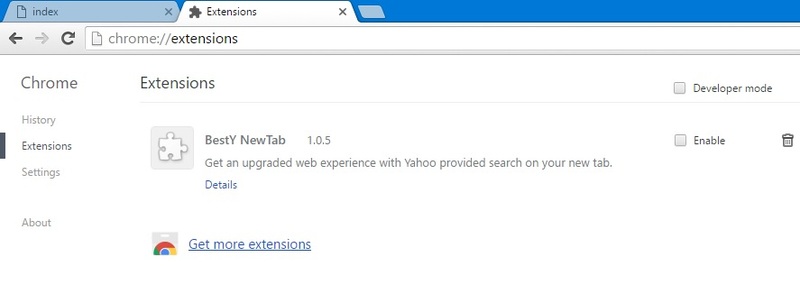
Those unwanted application will effect the Chrome browser(changing homepage, search engine...etc).
Top method to remove SHORTCUT VIRUS

Top method to remove SHORTCUT VIRUS

First of all, Welcome to My Learned Tricks blog.

Well, it’s been a long time since we discussed about virus removal. I wasn’t able to be active on my site for a long time due to some other works, now I am happy to be live again! Today, we will discuss about the removal of the most popular and problematic virus, the Shortcut Virus!
In this article, I will be explaining two different kinds of Shortcut Viruses and the ways to deal with them. It’s not very easy to clean them permanently since most Anti-Virus applications fail to detect them. Mostly, these viruses are spread through Pendrives.


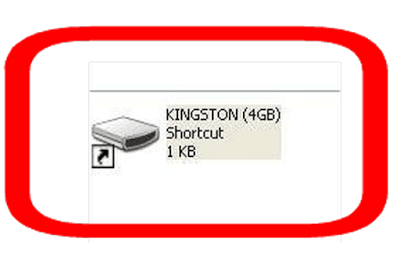
Above screenshot is of a kind of Shortcut Virus that is spread through Pendrives. Here the entire files in the Pendrive are moved into other folder that has no name (follow this tutorial to know how to create a folder without name) and kept super hidden in the Pendrive itself! When we open the shortcut, it will open that folder but, along with it a strange application will also execute and by that time, virus will be injected to your system!

Most users will just try to open this shortcut and that’s how the virus is spread to the system. All we have to do is the following steps:
First of all, just delete that Shortcut! It’s the main link that helps to execute the virus (Don’t worry, your’s files won’t be lost. They are all safe)
Now, if the Virus is already in your system, then the Shortcut will reappear! If it happens, then do the next step


Open Task Manager by Right Clicking on the taskbar
Now, in Details tab (Windows 7 & Older, Process tab), search for any of the following processes (in some cases, you may need to click Show process from all users)
taskhost.exe
 (it is not a virus, it is a system file, but helps spread virus sometimes)
process with meaningless names like: cbxghsrjgbdds.exe, odwcamszas.exe etc.
End all such processes by selecting them and clicking End Process Tree (or End Task) button
Now, try again to delete that shortcut. It won’t reappear. Then we have to recover our files that the virus took!
For that, open your pendrive and then open Folder Options
Windows 8/later: in the Ribbon, View tab -> Options.
Windows 7 users: Organize Folder -> Folder Options.
Windows XP: View -> Folder Options


In Folder Options, go to View tab and uncheck “Show hidden files, folders and drives” and uncheck “Hide protected operating system files (Recommended)“


There you can see a hidden folder with an icon of Pendrive, but it will not have any name. Open that folder, there you can find all your files
Move all that files back into the root folder of pendrive except a file with a long name (it is a virus file, ignore it)
Now delete that unnamed folder. That’s it! one more task remaining to completely remove the shortcut virus from your computer


Even though you performed all above steps, when you restart your system, the virus will again come back! Following steps should be done before you restart to completely remove the virus:
Remove all the processes I mentioned above from the Startup lists:


      SEE VIDEO HERE 

Top method to remove Write protection

Top Method To Remove Write Protection From Your Pen Drives / Memory Sticks


In most of the USB based flash/pen drives, write protection is provided via the small notch. First of all look for it in sides of your drive. It’s even marked with lock/unlock symbol. Move/slide the notch to unlock position (means releasing write protection) before you perform any file operations in your drive such as copy/paste/format etc. After that you can slide back the notch to lock position safely.

But many of the pen drives don’t provide hardware lock/notch for write protection. Instead they back it up by means of some software/tool. From there you can change the write protection lock/unlock option. Refer to your pen drive’s manual for more details in this regard as different pendrive have diferent ways to to unlock them or otherwise you can also take help of some tools to unlock them.

Just download this file Click Here

All you need to Just only click, Only one click. Your problem is solved. And a Great application is created by Askvirus

How to remove Google chrome virus

Are you facing problem with Google chrome 3rd party applications ?? 


Hello everybady, How is every one ?? Welcome to My Learned Tricks blog

Hi guys, how is everyone ??Do you know you can change fb theme in chrome ?? You van do many things in Google chrome. Yeah its good. What if that to be like bad ?? today i want to share another information about How to remove izzing, and worst search engines, Now a days Google Chrome is best browser to use everyone. Because it will be lite and efficient and also speed. why it is speed ? for google chrome it will use different processes in PC to overcame Hang and Lack. So many 3rd party Applications and Extensions to increase their PR Rating. Through Extensions only they are changing our browser settings. all you need is to keep an eye on extensions. All you need is just 10 mins times ;)

Now i will tell you how to overcame

You've 4 ways to overcame that problem.

1.Change simple settings in chrome

2.Remove user in settings

3.Delete Extensions

4.This will, when above 2 methods are work


1.Change simple settings

   For this thing you will need just basic stuff and basic knowledge. In chrome go to options tab in top right corner and click settings or options. That will take to you some window. You will find like History, Extensions, Settings, About...(etc)


With in it, go to settings you will have everything related your browser personification. you can find what ever you want.

     Startup settings: In this you can change while startup which page you want to open. Maximum problem is here only.
      Appearance settings: You can Enable Home button to reach any page instantly. this is the main thing that 3rd party application ruined our browsers
      Search settings: While searching anything in address bar their will be instant google search to search very quickly and getting google recommendations. the 3rd party application disable google instant search and they are using their own search engines to increase their PR Ratings
      People (user) settings: Different people will have different themes bookmarks and suggestions. this will allow you change your pattern style
      Default browser: This is allow to your browser if it is Redirecting from any application    


2.Remove user in settings

    That you are making your browser as a GAJINI. It will lost everything and it will be like new browser, i mean the first time using. Just go to Settings and you are redirected to another page there also another setting will be there with in it you will find user setting tab. Click on user(then only Delete option will highlight. click Delete user. There you go, You've Made it


3.Extensions:

  90% of changes in chrome are only made through extensions only. Extensions are used to personalize you chrome, now that will be using for their purpose ony. If you have look at these Extensions then, you can understand everything.

MAIN STEP IS INCUDED HERE. Instead of any applications they are using simple Extensions. you can find that extension here


 If you are not able to find is it useful or not. just take google help.

4.This will use, when above 2 methods are not work


 And What if You are still facing problem.? There am telling you another method about completely removing. In this method we will change that path of chrome browser.


That above pic you will find that Target place, that will tell you from which place it is starting. if you find anything like me in the pic. Just remove all the text after from CHROME.EXE.


Click Apply, Then OK

BBBBOOOOOMMMM You've successfully completed Your Chorme transformation. Nothing will get you..


MS .NET Framework 4.6


Hello everybody, How is every one ?? Welcome to My Learned Tricks blog


Hello guys how are you ? today I'm gonna show you one Tip for your PC. actually you are installing one new application in your PC, suddenly the installation aborted and asking about microsoft.net is required. why microsoft.net is required to the application ? microsoft Dot Net Framework is a application platform. and it will enable so many features to that application in order to use the application. of course that application is providing you miny features. so it must have to take permission from administrator. and this microsoft.net Framework platform is acting as a mediator between application you are installing that means that new application to the operating system which you are using in your PC for future applications and more like KasperSky antivirus and small applications. maximum of all applications they are need this microsoft.net framework must and should. today we will discuss about this


.NET Framework (pronounced dot net) is a software framework developed by Microsoft that runs primarily on Microsoft Windows. It includes a large class library known as Framework Class Library (FCL) and provides language interoperability (each language can use code written in other languages) across several programming languages. Programs written for .NET Framework execute in a software environment (as contrasted to hardware environment) known as Common Language Runtime (CLR), an application virtual machine that provides services such as security, memory management, and exception handling. (As such, computer code written using .NET Framework is called "managed code".) FCL and CLR together constitute .NET Framework.

FCL provides user interface, data access, database connectivity, cryptography, web application development, numeric algorithms, and network communications. Programmers produce software by combining their own source code with .NET Framework and other libraries. .NET Framework is intended to be used by most new applications created for the Windows platform. Microsoft also produces an integrated development environment largely for .NET software called Visual Studio.

.NET Framework started out as a proprietary framework, although the company worked to standardize the software stack almost immediately, even before its first release. Despite the standardization efforts, developers—particularly those in the free and open-source software communities—expressed their uneasiness with the selected terms and the prospects of any free and open-source implementation, especially with regard to software patents. Since then, Microsoft has changed .NET development to more closely follow a contemporary model of a community-developed software project, including issuing an update to its patent promise to address the concerns.

.NET Framework led to a family of .NET platforms targeting mobile computing, embedded devices, alternative operating systems and browser plugins. A reduced version of the framework, .NET Compact Framework, is available on Windows CE platforms, including Windows Mobile devices such as smartphones. .NET Micro Framework is targeted at severely resource-constrained embedded devices. Silverlight was available as a web browser plugin. Mono is available for many operating systems and is customized into popular smartphone operating systems (Android and iOS) and game engines. .NET Core targets cross-platform and cloud-based workloads in addition to the Universal Windows Platform (UWP).

The .NET Framework is Microsoft's comprehensive and consistent programming model for building applications that have visually stunning user experiences, seamless and secure communication, and the ability to model a range of business processes.
The Microsoft .NET Framework 4 redistributable package installs the .NET Framework runtime and associated files that are required to run and develop applications to target the .NET Framework 4.
The .NET Framework 4 works side by side with older Framework versions. Applications that are based on earlier versions of the Framework will continue to run on the version targeted by default.
.NET Framework 4 includes the following new features and improvements:
Improvements in CLR and BCL
Improvements in ADO.NET
Enhancements to ASP.NET
Improvements in Windows Presentation Foundation
Improvements to Windows Workflow Foundation and Windows Communication Foundation

Download MS Framework ClickHere

MS .NET Framework 4.6

The .NET Framework is Microsoft's comprehensive and consistent programming model for building applications that have visually stunning user experiences, seamless and secure communication, and the ability to model a range of business processes.
The Microsoft .NET Framework 4 redistributable package installs the ReadMore(....)

Auto Call Recorder


Hello everybody, How is every one ?? Welcome to Tricksntroll blog

Auto Call Recorder lets you automatically record all calls, or choose to record only those not from numbers in your contacts list. You can then save or delete the call recordings as per your wish. You can also share the recordings and there is a recent Dropbox integration provided as well. The app is good for its cost as it has many features included such as automatic cloud storage for selected contacts and different modes of working.

Requirements:

 Android 2.1 and up
Overview: Automatic call recorder!
In this ad free pro version you can automatically save calls from a contact and add comment to a recorded call.
You can also stop a recording in progress or start recording when a call is in progress.
Record all desired calls on your phone.
Select which calls to record:


You can record all calls or only those that are from numbers that are not in your contacts.
You can play, save and share the recorded calls.

Please note that on some devices recording a call is no possible so please try the free version first.
Auto call recorder also supports wav , ANR, 3gp formats.
Recording on an external sd card or any location desired is also possible.
The audio source is now configurable.
For playing the 3gp format you can use the "MX Video Player".

Record any phone call you want and choose which calls you want to save. You can set which calls are recorded and which are ignored. Listen to the recording, add notes and share it. Integration with Google Drive™ and Dropbox allows calls to be saved and synchronized to the cloud as well.
Google Drive integration works on Android versions 3.0 and above.
Please note that call recording does not work on certain handsets and can result in inferior quality recordings. We therefore suggest that you try the free version before purchasing the paid app.
If you encounter any recording issues or wish to improve voice quality, try recording from a different audio source, or use auto-on speaker mode.
Recorded calls are stored in the Inbox. You can set the size of the inbox. The number of saved calls is limited only by your device memory. If you decide that a conversation is important, save it and it will be stored in the Saved Calls folder. If not, old recordings will automatically be deleted when new calls fill up the inbox.
You can enable a Call Summary Menu with options to appear immediately after a call.
Search for recordings by contact, phone number, or note.
There are 3 default settings for automatic recording:
Record everything (default) – This setting records all calls except for contacts pre-selected to be ignored.
Ignore everything – This setting records no calls except for contacts pre-selected to be recorded.
Ignore contacts – This setting records all calls with people who are not contacts, except for contacts pre-selected to be recorded.
In the Pro version only: You can set calls from particular contacts to be automatically saved, and they will be saved in the cloud.

If you have a problem with the recording, please try to record with a different audio source,
which you can configure in the settings tab.
Try to record with speaker on or off , until you find the best combination for your phone.
For example you can try Audio Source -> Voice UpLink and speaker off.

What's New:
- Google Drive™ integration - sync recordings to Google Drive (Only for Android versions 3.0 and above)
- Dropbox integration improvements
- UI Improvements
- New edit mode - Now you can delete, share (Pro) and save (Pro) multiple recordings in the same view
- Bug fixes
- In previous versions:
- Support for additional languages - You can change languages in the settings

This app has no advertisement


To Download: ClickHere

Lost Back button in Android ?

Back Button

Hello everybody, How is every one ?? Welcome to Tricksntroll blog

Soft-key of the back button. I work does not require root.
The Floating Button and the Navigation Bar are displayed.
The home button and the notification bar can be displayed. The displayed button can be selected.
The Button or Widget can move in long push.

In almost all situations, the system maintains a back stack of activities while the user navigates your application. This allows the system to properly navigate backward when the user presses the Back button. However, there are a few cases in which your app should manually specify the Back behavior in order to provide the best user experience.

Back Navigation Design
Before continuing with this document, you should understand the concepts and principles for Back navigation as described in the Navigation design guide.
Navigation patterns that require you to manually specify the Back behavior include:

When the user enters a deep-level activity directly from a notification, an app widget, or the navigation drawer.
Certain cases in which the user navigates between fragments.
When the user navigates web pages in a WebView.

How to implement proper Back navigation in these situations is described in the following sections.

- The Navigation Bar is not supported in Hard-Navigation Bar(Galaxy etc.) and Android4.4 or later.
- Don't react to the tap of a widget.
- Widget supports operation only a "Clock&Battery"

In order to use it, please turn ON "Back Button" service from "setting -> Accessibility Option."
Android4.4 without the navigation bars.

Be careful when using this mechanism with highly dynamic web pages that can grow a large history. Pages that generate an extensive history, such as those that make frequent changes to the document hash, may make it tedious for users to get out of your activity.

Does not try to collect the terminal data this app.
[Network communication] permission not required, this app is safe.


To Download BackButton 

Font Changer (ROOT)


Free Download HiFont 6.1.7 APK for Android
Hello everybody, How is every one ?? Welcome to My learned tricks blog
As we all know, 10,000+ users downloaded HiFont - Cool Font Text Free latest version on 9Apps for free every week! This app is intended for an adult audience. This hot app was released on 2016-06-07. I believe that if you are an android apps lover, you would not miss it. 
HiFont is the best flipfont installer for android. Hundreds of handpicked written fonts style like cute, darker, candy colored fonts are all for you. And it is compatible with the font program on your phone
HiFont is designed to apply the COOLEST and most STYLISH fonts for your phone. You may download hundreds of fonts to customize your phone for FREE! Love, sweetie, colorful as you like.
We handpicked hundreds of most stylish and coolest fonts with different types, and is very easy to be applied. A change of a font, a change of a feeling.
We dedicate to create the most popular fonts for you! And that's why:
UNIQUE COLORED FONT RELEASEED!
Each colored font are specially designed for a specific themes. With our colorful font, you will expand the beauty of your font into a very new dimension!
You are about to download and install the HiFont 6.1.7 apk file (Latest Version) for Android 4.0 and up: HiFont is a free and useful Personalization app: Download it now (6.51 MB) > or Choose another mirror >
Package Name: com.xinmei365.font | File Name: com.xinmei365.font-6.1.7-APK4Fun.com.apk
Choose one of the server location above to start to get the apk file for HiFont, move the file to your Android phone's SD card and then use one file manager you prefer to browse & install it.
only share the original and apk installer for HiFont WITHOUT ANY cheat, crack, unlimited gold patch or other modifications.
Note: All the apps & games here are for home or personal use only. HiFont is the property and trademark from the developer Hi Fonts. If any apk download infringes your copyright, please contact us for a apk file removal.

Main features:
1.Support Samsung phones(via Galaxy S3 ,S4 ,S5 ,Note ,Note Ⅱ ,Note Ⅲ ) to change font perfectly (No root needed)
2.Support HTC,Motorola,Lenovo,Huawei,Nokia X and other phones to change font (Root needed)
3.Support Flipfont changer system
4.Support to use your own custom fonts.
5.Provide super big font for the elderly
6.Provide font for dyslexia font to help dyslexia readers
7.Adapt Solo Launcher
9.Cool emoticon and cute smiley.
10.Easily to change font size.
11. Special designer's font zone added!!!
12.New font will releasing weekly.
12.Colored font added!!!
(For Android 4.4 and higher device only)
CONTACT US
Email:john.papassa@gmail.com
Follow us on twitter:
https://twitter.com/HiFont
Follow us on facebook:
https://www.facebook.com/HiFont 

For years, people suffer from having no enough cellular data to download what they need. This top Personalization app is just 6.5M. It can be said with certainty that this app costs you almost no cellular data even if you hanging on the line all day long